
Enterprise IT teams must maintain firmware on a wide variety of devices, ranging from end-user laptops to fleets of servers and networking gear. Each individual device can contain dozens of individual firmware components that need to be kept up to date, including the system UEFI firmware, drives, network adapters, server BMCs, and more.
The tools and techniques used to update firmware on a device can vary considerably from one vendor to the next, and often even between different products from a single vendor. Different operating systems have different capabilities and play differing roles in the update of system and component firmware. This can create a potentially confusing landscape for IT teams as they try to maintain firmware across their many devices and components.
To avoid such confusion, it is important to know the many tools, features, and capabilities provided by the various vendors and operating systems. While IT teams should always refer to the official vendor documentation for a given tool, this paper provides a high-level comparison across multiple vendors and technologies to highlight how they are similar, how they are different, and how differences can affect the firmware update process.
What Does Upgrading Firmware Do?
Firmware is the low-level software that runs directly on a device’s hardware, before the operating system ever loads. It controls how a laptop’s motherboard, a server’s baseboard management controller, or a network switch’s chipset behaves at the most basic level, below anything a user sees on screen.
Security is one reason vendors release firmware updates so often. CISA maintains the authoritative source of vulnerabilities that have been exploited in the wild, and firmware sits low enough in a device that a flaw there can go unnoticed by the security tools running above it. Closing one of those flaws through a firmware update removes an attacker’s access point at a layer that antivirus and endpoint tools rarely reach.
A firmware update can also add support for hardware the device didn’t originally ship with, like a larger solid state drive or a new type of memory module. Other updates fix problems that only show up after months of real-world use: a laptop that won’t wake from sleep, a network switch that drops packets under load, a server fan that never throttles down. None of these issues require touching the operating system, because the fix lives one layer below it.
The tradeoff is that these low-level updates are harder to keep current than software patches. Firmware isn’t managed by the same tools that push operating system or application updates, and a device that hasn’t been touched in a year can be running a firmware version several releases behind without anyone noticing.
How Do You Update Firmware?
Updating firmware generally happens through one of three paths, and which one applies depends on the device and how it’s managed.
The most direct path is a vendor-supplied utility, run manually on the device itself. HP, Dell, and Lenovo each publish tools that check the current firmware version, download the new one, and apply it, usually followed by a reboot. This works fine for a handful of laptops, but doing it one machine at a time takes a long time when there are hundreds to cover.
Servers and network equipment usually offer a second path: an out-of-band management interface built into the hardware. A server’s baseboard management controller, accessed through IPMI or the newer Redfish standard, can receive and apply firmware without the operating system being involved at all. An IT team can push an update to a rack of servers from a remote console, without physically touching any of them.
The third path is automated delivery through the operating system itself, using a mechanism called encapsulation. Windows Update and the Linux Vendor Firmware Service both support this: the firmware ships as a signed package, and the OS installs it the same way it installs any other update. This is the option that requires the least ongoing manual effort, though it only covers firmware vendors have chosen to submit through the program.
The recommended path is to deploy Eclypsium to help you automate firmware updates at scale. Eclypsium gives teams the tools to proactively solve problems and mitigate firmware risk. Security teams can easily update firmware and device code to remediate vulnerabilities and trigger automated alerts and workflows to respond to security events.
- Patch Management and Updates
Remediate problems directly through the Eclypsium console or via API to download and install firmware updates. - Automated Responses
Powerful REST API integrates with other enterprise security tools such as SIEM and SOAR solutions to trigger automated responses and playbooks. - Dynamic Alerting
Configurable alerts let you monitor groups of devices for specific vulnerabilities or indications of compromise and notify endpoint operation or incident response teams when they are detected. - Emergency Patching
When vulnerabilities or configuration errors become actively exploited in the wild, multiple methods are available to hot-fix firmware updates.
Can a Firmware Update Be Done Remotely?
For most enterprise hardware, servers and network equipment with a baseboard management controller can receive firmware over IPMI or Redfish without anyone touching the device, and an admin can push that update to a whole rack from a remote console. Laptops and desktops are more limited, since most client-side tools still require the device to be on and reachable over the network, but that’s still remote in the sense that no one needs physical access to the machine.
Can Firmware Be Updated Automatically?
Yes, through a few different mechanisms. Windows Update and the Linux Vendor Firmware Service can install signed firmware packages the same way they install any other update, and enterprise tools like Dell Command | Update and HP Client Management Script Library can be scheduled to check for and apply updates on a set schedule. The limitation is coverage: automatic delivery only works for firmware the vendor has actually submitted through one of these programs, so some components still need a manual check.
Vendor Tools for Updating Firmware

Virtually all enterprise-grade vendors include tools to help teams check the current version of firmware and update firmware on a device. However, each vendor’s approach is somewhat distinct and can vary between product lines. This section highlights some of the core capabilities and differences between the tools of leading vendors.
HP BIOS Configuration Utility (BCU)
The HP BIOS Configuration Utility is one of the tools included under the umbrella of HP Client Management Solutions. As the name implies, it is an update utility for Windows and the BIOS configuration utility (BCU), a free utility that enables you to do the following:
- Read the BIOS settings.
- Reset the setup password.
- Replicate BIOS settings across multiple client computers.
The update’s executable utility generally works for a very limited amount of systems (systems that use similar UEFI firmware). And like almost all firmware updating tools, updates require a reboot.
HP Client Management Script Library (HP CMSL)
HP Client Management Script Library is a set of PowerShell commands that automates driver, BIOS, and firmware updates across HP business PCs and workstations. It queries the device, compares it against HP’s update catalog, and can download and apply software, driver, and firmware updates without walking through BCU’s manual read/set workflow.
CMSL also sets BIOS settings and boot logos through the same command set, so an admin can script configuration and updates together instead of using BCU for one and a separate tool for the other. HP maintains CMSL as a free download alongside BCU under HP Client Management Solutions.
HPE SPP and OneView
HPE Service Pack for ProLiant (SPP) is a software and firmware update tool for HP Enterprise (HPE) servers and also provides an ISO for manual updating. The tool works in conjunction with HP Smart Update Manager (HP SUM).
SPP contains a variety of firmware for the system; however, applying new firmware is not easy. The process requires a Media Server to provide updates, mount the SPP files, and perform several steps. Read a summary of the steps involved.
HPE OneView provides an overall approach to IT infrastructure management. This overall management platform includes the ability to update firmware on HPE platforms such as HPE ProLiant DL or ML, HPE BladeSystem, HPE Apollo or Mission Critical Servers, HPE 3PAR, and HPE Synergy. HPE has also moved OneView’s global monitoring layer under GreenLake, retiring the standalone OneView Global Dashboard in favor of HPE GreenLake for Compute Ops Management, OneView Edition.
HPE also provides the CONREP tool, which allows teams to read and write BIOS configurations from the command line.
HPE Intelligent Provisioning
HPE Intelligent Provisioning is a tool built into HPE servers which can be accessed by pressing a hotkey while the server boots and provides automated provisioning and firmware update capabilities. In addition to performing BIOS and BMC firmware updates, this tool can also update firmware on RAID controllers, Network controllers, and other add-in cards.
Lenovo Vantage
Lenovo System Update is a module inside Lenovo Vantage. The current Lenovo support documentation points people to Vantage as the entry point, with “System Update” showing up as a menu item inside it rather than something installed and run on its own. Lenovo devices use one of two separate apps depending on device class:
- Lenovo Vantage for consumer hardware (IdeaPad, Yoga, Legion)
- Lenovo Commercial Vantage for business hardware (ThinkPad, ThinkCentre, ThinkStation)
Lenovo also provides Windows executables for updating each firmware type individually. However, these executables only work for some specific systems or a small family of systems. Lenovo systems that run Linux can be
Lenovo Enterprise Tools
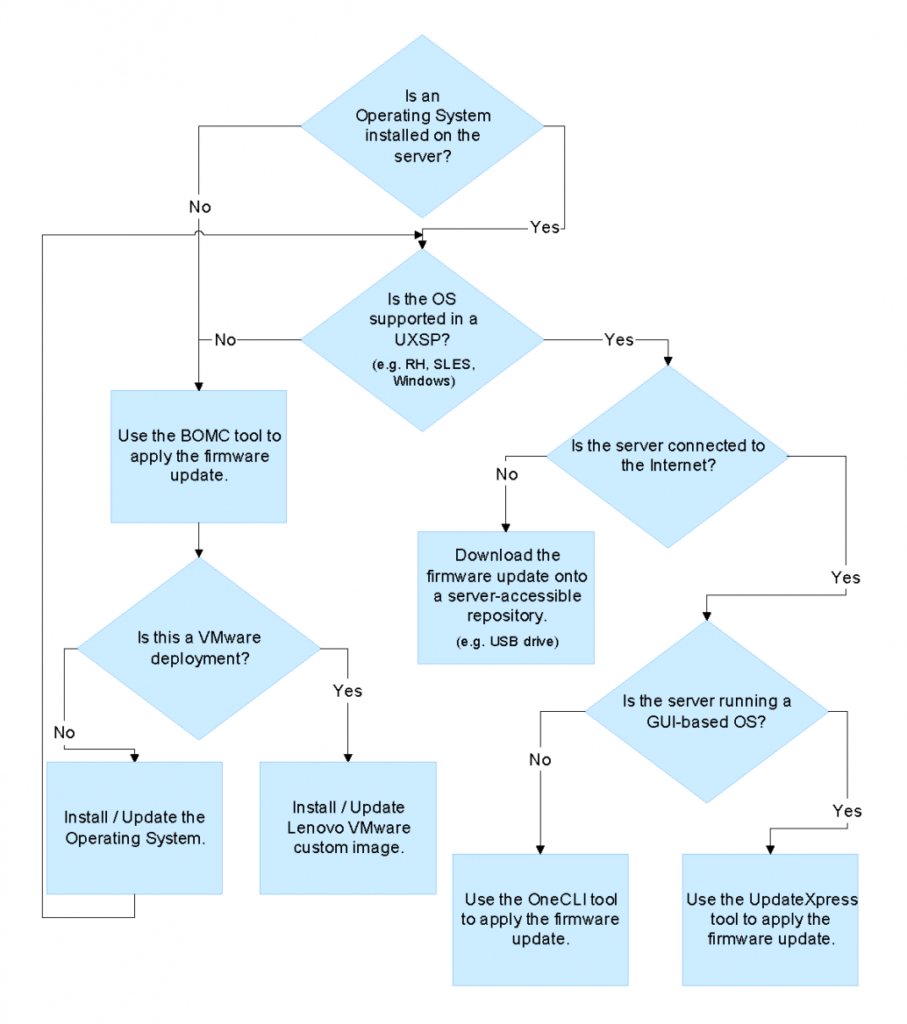
Lenovo enterprise systems, which primarily includes servers as well as some workstations, rely on a variety of different methods and tools to update firmware, depending on the deployment type. These tools include XClarity Essentials Bootable Media Creator (BoMC), XClarity Essentials UpdateXpress, and XClarity Essentials OneCLI.
The following Lenovo image provides an overview of the different methods that are used in different situations.
Dell Client Configuration Toolkit, Command | Configure
Dell has provided tools under several names that allow staff to modify Dell BIOS settings on workstations. The Dell Client Configuration Utility (DCCU), Client Configuration Toolkit (CCTK), and the Command | Configure tools provide similar capabilities tied to specific generations and types of Dell hardware. The tools work by creating a stand-alone package that is manually run on a Dell client computer to configure a BIOS, update a BIOS, or capture BIOS settings inventory data.
Dell also provides individual executable packages for Windows for updating firmware in Windows. However, these executable wrappers can change considerably between versions and only work with specific systems or families of systems. Additionally, Dell publishes SCUP catalogs for SCCM that support automated firmware updates.
Dell Command | Update (DCU)
Dell Command | Update is Dell’s tool for automating BIOS, firmware, and driver updates on commercial client hardware. It runs on the device, checks the current configuration against Dell’s support catalog, and downloads only the updates that machine needs.
Updates are grouped into categories such as security, critical, and recommended, so an admin can install everything at once or choose individual items before the required reboot. Dell Command | Update has taken over most of the update work that CCTK and DCCU used to handle, and it remains under active development, with Dell shipping new releases through 2026.
Dell Enterprise Tools
For Dell enterprise systems, the update process almost always includes the BMC. Dell’s BMC utility helps users manage the system remotely, including flashing BIOS updates. One can also access the server and run the executable provided to update it manually.
Dell also provides a Dell EMC Server Update Utility which allows for updating the firmware of the server with physical or remote access to the system. Additionally, Linux-based Dell systems can use the LVFS service.
Apple
Apple firmware updates are included in MacOS updates automatically as part of the regular update process. Find more information from Apple.
RedFish Standard
Developed by the Distributed Management Task Force (DMTF), the Redfish standard provides a RESTful API for the management of servers and IT infrastructure and attempts to address some of the issues present in IPMI. This includes the ability to inventory and update firmware on devices. As an industry standard, Redfish is supported by a variety of vendors including Dell, HPE, Lenovo, and many others. However, Redfish is a relatively new standard and vendors are still adding support for it in devices. For example, a vendor may support both Redfish and IPMI on the latest generation of a device, while previous generations may only support IPMI or a more limited set of Redfish capabilities.
Commonalities Across Vendors and Tools
There are a variety of tools related to firmware and a variety of approaches to firmware updates. However, there are some areas that are relatively similar across vendor approaches.
In terms of dependencies, most of the tools are portable. Windows tools typically don’t need anything other than the OS runtime, and the bootable ISOs are also self-contained (in this case, one can consider the physical dependency of having a bootable storage device in which to write the ISO).
Most vendors support a “silent mode.” The parameters for each vendor’s silent mode are as follows:
- HP: Run the application with the /Silent parameter.
- Dell: Run the application with /silent or /s.
- Lenovo: Lenovo provides two parameters, /silent and /verysilent. There are reported cases where the silent mode doesn’t work. It depends on how the application is packaged and its version.
Additionally, all tools that update the system firmware will require a reboot.
Open Source Firmware Options
As an alternative to vendor-supplied tools, some organizations may want to consider an open-source approach to firmware updates and even development. While this option can require considerable development resources, organizations may have specific needs that make it desirable. With direct control over the firmware update process, organizations can:
- Create a more standardized way of managing their firmware that is not limited by the capabilities of a given vendor’s tools.
- Establish their own hardware root of trust based on their own certificates.
- Develop their own firmware update and release cadence.
In order to take an open-source approach to firmware updating, organizations will need to use hardware that supports open source firmware such as coreboot, LinuxBoot or openBMC. Again, directly maintaining firmware can be risky and requires a very technically savvy team in order to support the project safely. Organizations should therefore carefully review their requirements and capabilities before adopting this approach. However, if needed, teams may actively select for vendors that support these standards or pressure vendors to support them via feature requests.

A BIOS Vendor Perspective
Firmware updates are usually considered risky. However, everyone seems willing to do security-related updates. Users rely on OS or platform vendor notifications, but some users want to be more informed.
Current solutions rely on checking whether the firmware version is the latest firmware version. This works for functional issues but not for security issues. It does not help when the firmware image has been tampered with (but still reports the same version information) or is misconfigured.
One solution is to add fingerprints. Fingerprinting detects undesirable changes in the immutable portions of the firmware image. Tools can check the fingerprint against an online database of golden images and provide updates if it is not found. This requires an update to the build process to insert flash usage information into the flash binary, such as a hash of the logical regions and information about whether the region is expected to be modified. The fingerprint itself can be signed, allowing auditing by tools or BMCs purely through inspection of the binary to detect post-manufacturing tampering.
Another solution is checking whether the security-related firmware settings are correct. Bad settings can weaken the security even if the platform has the right firmware version. Tools like CHIPSEC and Eclypsium evaluate the security-related settings of the platform and generate a report.
Using this report, tools can provide a simple pass/fail indicator to users to let them know that something is wrong, along with instructions about which settings need to be changed. The tool could also download setting updates that can be automatically applied.
Alerting users that their platform might be compromised improves the adoption of firmware updates. Insyde uses these techniques in its InsydeH2O firmware and InsydeSST tools to alert users and help them resolve it.

Firmware Updates via Encapsulation

Recent industry efforts have focused on making firmware updates far more transparent and automated through a process called encapsulation. The UEFI specification provides a standardized mechanism for storing and processing updates as a “capsule” that is presented to firmware during the boot process.
The overall process works by allowing vendors to submit signed firmware updates to a central repository; the updates are then delivered to users and installed by the operating system. This provides a much more centralized approach to managing firmware updates and greatly streamlines the update process.
Adding this capability means vendors can support system firmware updates via a standardized format that could potentially be used by any OS. Most notably, Microsoft Update and the Linux Vendor Firmware Service (LVFS) have led the way with methods to enable the host operating system to automate installation via encapsulation. Likewise, Apple’s macOS firmware updates are automatically included as part of regular OS updates via encapsulation.
While the major operating systems all support encapsulation in some form, there are gaps created both by each OS’s approach as well as participation from the relevant OEMs and ODMs. For example, Microsoft-based updates are largely limited to UEFI firmware updates, so organizations may need to apply a more manual approach to updating peripheral components. The Linux-based LVFS, on the other hand, does provide encapsulation for both UEFI and peripheral firmware updates.
In any case, it is important to note that not all firmware vendors participate. This creates potential gaps where support will vary considerably based on the combination of operating system, OEM, and components within a device. Vendors such as Dell provide SCUP catalogs that include firmware for use with Microsoft SCCM, for example. However, not all vendors support such integration, and teams will need to be aware of the options on a vendor-by-vendor basis. Organizations must have visibility into their devices to understand which components can be updated via encapsulation and which will require a more manual approach.
Find the Firmware Gaps in Your Fleet Before They’re Exploited
Firmware updates depend on having the right tool for the job, whether it comes from the OEM, the operating system, an open source project, or a third-party platform, and keeping that toolset current only gets harder as a fleet mixes vendors, device types, and firmware generations.
Even a disciplined firmware update program answers a narrower question than most security teams actually need answered. It confirms what version is installed and whether a newer one exists. Whether that firmware has already been tampered with, whether a configuration setting has quietly drifted, or whether an attacker is already living inside a device that looks fully patched on paper is a separate question entirely. Network edge device exploitation climbed roughly 8x between 2024 and 2025, with barely half of those vulnerabilities fully remediated and a median patch time over a month, long enough for an attacker to get in and stay.
Firmware is one layer of a much larger hardware attack surface. Every device on a network carries dozens of components, firmware images, and embedded operating systems, each with its own supply chain and its own opportunity for something to go wrong before the device ever reaches IT. Most tools don’t verify that the hardware underneath the firmware hasn’t already been compromised.
Is your enterprise hardware at risk? Try out Eclypsium for security that protects your foundation.